 AI Traffic Control
Scale email volume safely with AI Traffic Control
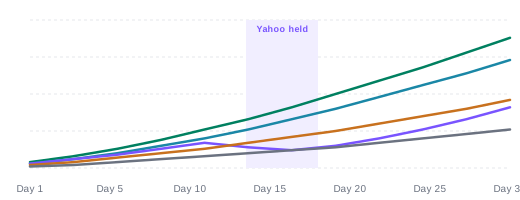
AI Traffic Control is tinyEmail's automated warmup. It sets daily send volume for each inbox provider, such as Gmail, Yahoo and Outlook, reads bounce codes and engagement as you send, backs off when a provider pushes back and speeds up when it is safe. You scale without burning your sender reputation.
 Per-provider volumeAdapts every sendDecisions you can see
 How it works
How does automated IP and domain warmup work?
Three steps, and the AI handles the daily decisions.
- 1
Choose a warmup type
A brand-new domain, or an existing domain already sending on tinyEmail.
- 2
Volume ramps per provider
Gmail, Yahoo, Outlook and the rest each get their own daily volume.
- 3
Every send adjusts the next
Bounce codes and engagement decide whether to hold, back off or speed up. Each call is logged.
 Per provider
Why warm up each inbox provider separately?
Gmail, Yahoo and Outlook judge senders in their own way. One shared ramp is too slow for some and too fast for others.

Its own lane for every provider
Volume rises where engagement is strong and waits where a provider resists.

Protects your sender reputation
Backing off early keeps a bad day from turning into blocked mail.

See every decision
The AI Decisions Log and Open Rate History show what changed and why.
 Results
How fast can you scale email volume?
Three real scenarios from one digital publisher, all run with AI Traffic Control.
Moving from Beehiiv
0 → 1Msends a day, in 10 daysWarming a brand-new domain
0 → 100ksends a day, in 30 daysGrowing an existing list
300k → 1.5Msends a day, in under 30 daysWarmup typesWhich warmup do you need?
In the app you pick one of two warmup types. AI Traffic Control sets the pace from there. Ramps shown are illustrative.
Brand New Domain
Starts from a few hundred sends and grows only when engagement and provider feedback are positive.
Best forA new sending domain, or a migration onto a fresh domain.Existing Domain
For a domain already sending on tinyEmail: volume grows from where you are, provider by provider.
Best forScaling up, reactivating older contacts or recovering after a dip. FAQ
FAQAI Traffic Control questions
Can't find your answer? Our team is here 24/7.
 Talk to support
 All FAQs
What is IP warmup?
IP or domain warmup means raising your sending volume step by step, so inbox providers learn to trust a new or quiet sender before you send at full volume.
How does AI Traffic Control decide how much to send?
It sets volume for each inbox provider separately, reads bounce codes and engagement after every send, and holds, backs off or speeds up based on what it sees.
Which inbox providers does it manage?
The app tracks Google, Microsoft, Yahoo, Apple, AT&T, Comcast and other providers, each with its own volume and open rate history.
Can I warm up a brand-new domain?
Yes. Choose the Brand New Domain warmup type, or Existing Domain if you already send on tinyEmail.
How fast can I scale?
It depends on your list and content. In one case study a publisher took a new domain from 0 to 100k sends a day in 30 days at 99.5%+ deliverability.
Does it guarantee inbox placement?
No tool can guarantee inbox placement. AI Traffic Control lowers the risk by reacting to each provider early, and the decisions log shows you every change.

Scale your sending without the risk
Free for Shopify stores. Everyone else gets a 7-day free trial, then pays per email sent.
