 Analytics
Email analytics that show what drives revenue
tinyEmail's email marketing analytics show what every campaign and workflow delivers: emails delivered, bounced and marked as spam, unique opens and clicks, unsubscribes and sales. Compare results by inbox provider, follow email traffic in Google Analytics with UTM tags, and let AI Summary explain the numbers in plain language.
 Delivery and engagementResults by inbox providerAI Summary
 Reports
What can you measure in tinyEmail?
The same views you see across the top of the Analytics screen, each answering a different question.

Sent, delivered, bounced and spam, with deliverability and engagement charts for any date range.

Where your subscribers come from and which inbox providers they use.

Results by inbox provider and sender, so you can spot a problem with one domain early.

How newly engaged subscribers respond, separate from your long-time readers.

Pick an audience and see how engaged it is, from active to dormant.

How AI Traffic Control is pacing your sending, provider by provider.
 Revenue
How do you see which emails make money?
tinyEmail tracks sales alongside opens and clicks for every send, and the Google Analytics integration follows email traffic onto your site with UTM tags.

Sales tracked automatically
Opens, clicks, unsubscribes, sign-ups and sales for each campaign and workflow.

UTM tags for Google Analytics
See email sessions and conversions next to the rest of your traffic.

Export and compare
Pick custom date ranges and export reports to share with your team.
 Metric glossary
What does each email metric mean?
The numbers you will see in tinyEmail, in plain words.
 Delivery
- Delivered
- Emails accepted by the inbox provider.
- Bounced
- Emails the provider rejected, for example because the address does not exist.
- Spam
- Emails a subscriber marked as spam.
 Engagement
- Unique opens
- How many subscribers opened at least once.
- Unique clicks
- How many subscribers clicked at least one link.
- Unsubscribes
- Subscribers who opted out after the email.
 Totals and revenue
- Total opens and clicks
- Every open and click, including repeats from the same person.
- Sales
- Orders that came from an email.
- Deliverability by domain
- The same metrics split by Gmail, Yahoo and other providers.
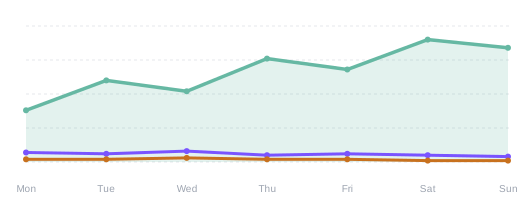
During the past 7 days you sent 48,200 emails with a 98.7% delivery rate. Unique opens rose to 38.4%, led by your Tuesday newsletter, while clicks held steady at 6.2%. Unsubscribes stayed low. Try sending your next promotion on Tuesday morning.
Illustrative · demo data AI Summary
What if the report explained itself?
AI Summary turns your analytics into a short paragraph: what changed, what worked and what to try next. It is on every plan.
Campaign reportWhat does a campaign report show?
Open any campaign for four tabs: Overview, Audience, Performance and Feedback.
Delivery, step by step
Requests, sent, delivered and delivery rate, plus anything suppressed or excluded.

Opens and clicks
Total and unique counts, rates and your top clicked links.
Performance over time
A trend chart of how the campaign landed after send.
 Your way
Can you slice and share the numbers?
Pick the period, see where your readers are, and take the data with you.

Custom date ranges
Compare this week with last month, or any range you choose.
Location insights
See where your opens and clicks come from.
Export reports
Download your results to share with the team or your own tools.
FAQAnalytics questions
Can't find your answer? Our team is here 24/7.
 Talk to support
 All FAQs
What can I track in tinyEmail analytics?
Emails delivered, bounced and marked as spam; unique and total opens and clicks; unsubscribes; sign-ups and sales, for every campaign and workflow, over any date range.
Can I see results by inbox provider?
Yes. Domain Level Performance and deliverability by domain split your results by Gmail, Yahoo and other providers, so you can spot a problem with one of them early.
Does tinyEmail track revenue from email?
Yes. Sales are tracked alongside opens and clicks, and the Google Analytics integration lets you follow email traffic onto your site with UTM tags.
Can I export reports?
Yes. Pick a custom date range and export your reports.
What is AI Summary?
AI Summary reads your results and explains them in plain language, with trends such as best send times and a suggested next step. It is available on all plans.

Know what every email earns
Free for Shopify stores. Everyone else gets a 7-day free trial with full analytics, then pays per email sent.
